

Starting Listings, Selling & eBid Stores
- Can I really list for free?
- How much does it cost to sell?
- How do I start a listing on eBid?
- How can I edit listings I'm running?
- What is a bid increment?
- How do I contact the buyer?
- What if I can't contact the highest bidder?
- Can I change my listing description or category?
- How can I check on my account?
- How do I add a description to my listings?
- What is a reserve price?
- What if the reserve price isn't met?
- How can I add a picture/photo to my listing?
- What is a "Multi-item Listing"?
- What are FREE, SILVER, GOLD and PLATINUM LIFETIME?
- What is the number next to the each username?
- What is the BuyNow facility?
- Can I bulk upload my listings?
- What is a "Standard Listing"?
- What is a "Platinum Listing"?
- What is a "Free Listing"?
- What is a "Gallery Listing"?
- What is a "Featured Listing"?
- What is a "Frontpage Listing"?
- What are "Happy Hour" listings?
- Can I stop unwanted users from bidding on my listings?
- What's an "On First Bid" listing?
- What happens after the listing closes or a BuyNow is made on my item?
- What items are banned on eBid (eBid Listing Posting Rules)
- What if I'm caught breaking the rules?
- What is the "Auto Extend" option?
- Can I open an eBid Store?
- How can I add my new and existing listings to my eBid Store?
- Can I list with a barcode or pre-filled Info?
- Can I add defaults to forms when selling to save time?
- What happens to data I "Save for Later" when listing?
- What is the SKU facility on the Listing Form?
- What is a "Private Listing"?
- What does "Run Until Sold" mean?
- What is the "Fixed Price" checkbox for?
- Can I add a video to my listing?
- How can I advise potential buyers I am away on vacation/holiday?
- Shipping Options. Editing and additional shipping for multi purchases.
- Can I start my listing at a specific time?
- Can I end my listing at a specific time?
- What is the eBid Ninja Lister?
- Can I import listings from other Marketplaces?
- Will you upload my items to Google Shopping?
- Seller Tips.
- How can I pay or accept payment via PayPal.com?
- Can I import my listings from Amazon?
- How can I Close or Delete all my listings at once?
- How can I export a record of my current listings?
- How can I add a sale/mark down/discount to my items?
- Can I import my feedback from another marketplace site?
- Can I set up my listings to accept offers from buyers?
- Why are my photos/pictures not showing on search results for my listings?
- What is the criteria for appearing on the Hot Sellers list?
- How do I set up my listing so they require immediate payment?
- How do I repost a listing that has finished?
- How do find the ID of an eBid category?
Can't find an answer? Ask on the eBid forums.
1) Can I really list for free?
Yes. On eBid it is free to list your item. After you have joined you will need to upgrade your account from FREE to either SILVER (free but card validation required) or GOLD and PLATINUM LIFETIME (security subscription required).
A SILVER account gives you access to our STANDARD listing format which is free to list with a 5% Final Value Fee. If you pay to upgrade to GOLD or PLATINUM LIFETIME you can use our FREE listing which is also free to list but also has 0% Final Value Fee. See our Registration FAQ page for more details on upgrading your account. GOLD subscriptions can be purchased for 30 days, 365 days or a Lifetime giving you zero listing fees and zero final value fees for life. Check out our current special offer for half price PLATINUM LIFETIME upgrades. No more fees for life.
2) How much does it cost to sell?
eBid has 6 forms of listing. They are all different in their own way, some are available to only SILVER account type holders, some are available to only GOLD or PLATINUM LIFETIME account type holders. See below for a full explanation. Also view our "Fees & Charges" FAQ page for more info.
| Listing Type? | Thumbnail in Results | Photos | Top of Results | Listing Fee | BuyNow Available | Final Value Fee | |||
|---|---|---|---|---|---|---|---|---|---|
| SILVER Accounts free upgrade | |||||||||
| Standard | N | 1 | N | $0.00 | N | ||||
| Platinum Listing | Y | 15 | N | $0.05 | Y | ||||
| GOLD & PLATINUM LIFETIME Accounts paid upgrade | |||||||||
| Free | N | 1 | N | $0.00 | Y | ||||
| Gallery | Y | 15 | N | $0.00 | Y | ||||
| All Accounts | |||||||||
| Featured | Y | 15 | Y | $0.99 | Y | ||||
| Frontpage | Y | Y | Y | $3.99 | Y | ||||
You can also add "Extras" to your listing to improve its visibility throughout the site. The cost is per posting of a listing.
| Extras Name | Extras Fee | Extras Improvement |
|---|---|---|
| Subtitle | $0.15 | Add a subtitle in small lettering under the main title on all category, subcategory and search result listing pages that your listing appears on |
| Highlight | $0.18 | The entire row of your listing will be highlighted on all category, subcategory and search result listing pages that it appears on |
| Bold | $0.07 | The title of your listing will be bold on all category, subcategory and search result listing pages that it appears on |
| Extra Photo | $0.05 | Add extra photos to your listing page |
| Extra Category | $0.05 | Show your listing within another category as well as your main chosen category |
3) How do I start a listing on eBid?
Simple answer is to click here and choose which category you want to place your item(s) into.
All sellers must have SILVER, GOLD or PLATINUM LIFETIME access, that means they must have a credit or debit card validated with us. We run these through our secure payment processors to allow us to check the authenticity of the users selling on eBid. This cuts out fraud dramatically and stops sellers spamming the site with worthless listings.
Once you have SILVER, GOLD or PLATINUM LIFETIME status then click the link to SELL at the top of the page and choose your category. Fill in a title, description, price, shipping costs and the payment methods you wish to use to receive money (see below for details on payment processors you can accept on eBid).
Canadian customers with a PLATINUM LIFETIME subscription will have the option to change their listing currency. As well as the home currency of CAD, USD and GBP are also available. This option is made from Section One of the listing page. Customers posting listings using the Bulk Upload option should refer to the example spreadsheet help section that can be found at My eBid > My Bulk Upload.
4) How can I edit listings I'm running?
Click on "Edit/Close Listing" on the individual page for the listing you wish to change.
Enter your details, some things cannot be changed once a bid has been placed.
If you have posted an listing with a quantity of 1 (single-item auction) you will not be able to edit the quantity to a larger amount. Listings with quantities greater than 1 are multi-item listings and have a different bidding process, these can be changed to any quantity between 2 and 99.
There is also an option to Bulk Edit multiple listings at once- Go to My eBid > My Bulk Edit for more information.
5) What is a bid increment?
The bid increment of your listing is the amount the minimum bid price is automatically raised by after each bid is made.
If the current price is between 0.01 and 0.99 this means the bid increment will be 0.05
between 1.00 and 4.99 => 0.25
between 5.00 and 24.99 => 0.50
between 25.00 and 99.99 => 1.00
between 100.00 and 249.99 => 2.50
between 250.00 and 499.99 => 5.00
between 500.00 and 999.99 => 10.00
between 1000.00 and 2499.99 => 25.00
between 2500.00 and 4999.99 => 50.00
between 5000.00 and 9999999.99 => 100.00 .
6) How do I contact the buyer?
You will be automatically sent the buyers full contact details by email when your listing reaches its end.
7) What if I can't contact the highest bidder?
If you've been unable to contact the high-bidder by email, then you may, if you desire, contact the under bidders. If there are other bidders for your item, you can contact them in the order in which they appear in your item's bidding history. Please remember that many people don't access their e-mail daily, so they may not be intentionally ignoring you if you don't hear from them straight away. You can see the bidding history by logging into the members area and looking up the listing in question from the My eBid > Selling > Listings I Ran.
8) Can I change my listing description or category?
Click on "Edit/Close Listing" on the individual page for the listing you wish to change. Enter your details, some things cannot be changed once a bid has been placed.
9) How can I check on my account?
You can check on your account by logging into the members area and clicking on the My eBid > My Fees link, here you will see your live account details, with your current balance.
10) How do I add a description to my listings?
When posting your listings we have three types of Description Editors available for entering and editing information : Plain HTML Box, WYSIWYG Simple and WYSIWYG Advanced. Your favoured method can be selected when posting listings by using the dropdown menu in the 'Listing Description' section. You can also set your editor default in the My Defaults section. To do this go to My eBid - My Defaults (left hand side menu) and select your preference in the General Defaults section. There is a limit of 500000 characters to a single listing description If you are adding your own HTML to this editor please note that any tags before the <body> tag in your code will be stripped so if you have stylesheets make sure you put them in the body of your code.
Plain HTML Box : If you already have HTML prepared then this can be pasted into Plain HTML Box. Your code will not be formatted or changed in any way.
WYSIWYG Simple : This will enable you to get your auction up and running with the minimum of fuss. What you type into the description area is how the auction will be shown when the auction is posted. There are a minimum number of Tool icons available but sufficient to get a no frills auction on site quickly and efficiently.
WYSIWYG Advanced : Similar to the WYSIWYG Simple option but with far more editing and HTML options available to enhance your auctions. We recommend using this if you are building your listing descriptions from scratch. If you wish to copy and paste HTML or text from Microsoft Word into this editor it will be subject to the formatting rules of the editor and may not be a 100% match to your original document. Some tags will be stripped from your HTML when using this method. We recommend the Plain HTML Box if you already have your description HTML ready.
11) What is a reserve price?
The reserve price of an auction is the minimum price that the seller of the item is willing to sell the item for. This price should be above the minimum bid price. The auction will begin at the minimum bid price and once the bidding reaches the reserve price then the seller is obliged to sell the item placed for sale. Reserve prices are only available on single-item auctions. Multi-item auctions should have their starting bid set to the minimum amount you are willing to accept.
12) What if the reserve price isn't met?
If an auction ends and the reserve price has not been met, both the seller and the high bidder are released from any further obligation to complete the transaction. The buyer must know that if they did not meet the reserve price, then as stated, the seller will not be willing to sell the item.
13) How can I add a picture/photo to my listing?
Uploading a picture to your new listing is very simple. When posting your item, in the Photos section, click on the "Choose Photo" button, then when taken to the Gallery section select either the Advanced or Simple Image Upload Form links available on the green header bar. If using the Simple Image Upload Form you can input the location of your image. If the image is on your PC select 1) Locate photo or zip on your computer and hit the "Browse" button to locate the photo on your computer. If the image is stored elsewhere on the Internet select - 2) Enter URL of photo and enter the location of your image on the internet. The Advanced Image Upload Form enables you to select and upload multiple images quickly and easily from your PC.
By default images are uploaded and can be managed from the folder named "General" in your "My Gallery" section. You can add a new folder to your "My Gallery" section by using the dropdown menu at "Upload to Folder" and select the Add New Folder option.
Files should be BMP, GIF, TIF, PNG or JPG and should be below 25MB in size.
In the Simple Image Upload Form you will also be able to add a Title to your pictures to aid you in finding and filing your images.
You can add multiple images by uploading your images within a Zip file. To do this go to My eBid > My Gallery and on the Image Upload Form choose 1) Locate photo or zip on your computer. Click the button to browse your hard drive for the the Zip file. Please ensure that only BMPS, GIFs, JPGs, TIFs and PNGs are included within the zip and the zip file size is less than 200MB. More information on creating a Zip file.
Once you have the photo(s) uploaded to "My Gallery" then click the "use this picture" link or alternatively tick multiple boxes to choose more than one photo and then hit the "Use Selected Images" button. Please note GOLD accounts can add up to 5 free pictures and PLATINUM LIFETIME 20 in their auctions for free. SILVER users can add 1.
Images will be kept within your "My Gallery" section for a 200 day period after they become unused (eg. not being used within a live or closed listing). If you wish to use some images within your listing description that are not being used in the photo section also we recommend not hosting these in "My Gallery". Use a free online photo hosting site such as Snapagogo.com Free Photo Hosting and use your hosted photo within your listing description.
If you have posted a listing with the listing types Free or Standard then you will see a camera icon against your listing in the category listings and search results rather than a thumbnail picture. To see a thumbnail picture SILVER accounts can upgrade individual listings using the Platinum listing type and GOLD accounts can upgrade listings using the Gallery listing option. Both subscription types can also post listings as Featured and Frontpage to obtain a thumbnail picture in the listings.
14) What is a "Multi-item Listing"?
A Multi-item Listing is a listing in which the seller has up to 99 identical items to sell. When starting a Multi-item Listing the seller must enter the quantity, starting bid (reserve price is not used) and bid increments. All winning bidders pay the same price, which is the lowest successful bid.
Bidders must specify both a bid price and the quantity they want to buy. Proxy bidding is not used in Multi-item listings. Again, all winning bidders pay the same price, which is equal to the amount bid for the last item of the collection.
Example:
Say there is a multi-item auction for ten identical items.
Let's say at the end of the auction there have been four bidders..
the first bidder bid $3.00
the second bidder bid $4.00
the third bidder bid $5.00
the fourth bidder bid $6.00
At the end of the auction the four winning bidders each pay $3.00
(this is the lowest amount, in this case $3.00)
Now lets say (using the same scenario) the multi-item auction
was only for three identical items..
only the second, third and fourth bidders would be winning bidders
and they would all pay $4.00
the first bidder would have had to bid a higher amount before the auction ended to stay in the running (because there were 4 bidders and only 3 items).
Remember, all successful bidders will pay the same price, which is the lowest successful bid.
Finally, remember demand must exceed supply for the starting bid to go up and even then most users win the items they bid on at the minimum asking price but the only way to be assured of being a winner is to make sure you are not the lowest bidder.
15) What are FREE, SILVER, GOLD and PLATINUM LIFETIME?
Different levels of access give members different facilities. For more details view our Registration, Upgrading and Logging in FAQ page.
16) What is the number next to the each username?
Every time a member has been involved in a successful listing they are expected to leave feedback on the counterparty. You have an option of leaving either Positive, Neutral or Negative feedback along with any comments you have about your experience with this member. This will give other members of the community an insight into the trustworthiness and reliability of this individual. To leave feedback you need to go to your own eBid login area and click on the "myFeedback" section.
17) What is the BuyNow facility?
BuyNow allows you to list an item with a BuyNow price above your specified reserve and starting price. It must be greater than your Starting Bid. If a potential bidder elects to use the "BuyNow" price they will have to pay a premium. By paying the BuyNow premium the buyer is Guaranteed a successful purchase of your item. If the BuyNow feature is elected, the item listing will close immediately and will not enter into an auction type bidding war.
BuyNow will only be available during the opening period before any bidding activity has started. BuyNow is only available to GOLD and PLATINUM LIFETIME members or to SILVER members using the Platinum feature option. You can also use the BuyNow facility on its own without bidding facilities by choosing the Fixed Price method of selling. Adding a BuyNow price also allows your item to be uploaded to Google Shopping (subject to minimum price) for more exposure.
18) Can I bulk upload my listings?
eBid has a few options to make it easier to add your items in bulk instead of on a one-by-one basis using the normal listing form. For the more technically inclined there is the eBid API and Developer Portal. Both XML and JSON versions are available. All the available API methods are viewable via the online docs, you should find all you need to list your items as well as to manage any sales that you receive. Just visit the site and sign up for a free developer account.
SILVER, GOLD and PLATINUM LIFETIME account holders can make use of the eBid Ninja Lister to create listings and to import listings from other online marketplaces. See FAQ 46 for more. GOLD and PLATINUM LIFETIME account holders can also download the eBid Spreadsheet from the My Bulk Upload section of My eBid. Listings should be added to the sheet following the instructions on the sheet and then uploaded in tab delimited format via the form on the My Bulk Upload page. If using the Upload via FTP option please note that the listings will automatically launch unless there are issues that need to be addressed prior to launch. In which case it will require a manual launch from the My eBid > My Bulk Upload section.
Files must be saved as TAB delimited .txt format. Comma delimited (.csv) and excel native files (.xls) cannot be uploaded.
In Excel : File > Save As > choose Tab Delimited (txt) option.
In Open Office : Save As > CSV > But choose TAB as delimiter when asked.
eBid Bulk Spreadsheet Instructions
Column A
Enter your username. Make sure you spell this correctly as you will NOT be notified of success or failed uploads if this is incorrect.
Column B
Enter the category id for the auction. Category ids can be found by clicking the "CATEGORIES and their IDs" tag at the bottom of the spreadsheet.
Column C
Your eBid Store category. If you wish to add this listing to your eBid Store then add the store category id. You can find these in the "My eBid Store" section of My eBid. View the list of categories you added and in the left column you will see a number.
e.g.
8 - Add a single number as long as there are no subcategories. You will be returned an error if you add a parent category id and subcategories for that category are present.
9a - Always add a subcategory id if you have one.
2:9a - If you have more than one store make sure you add the store id then a colon followed by the the category id. eg. 4:12a . The store id can be found on the config page for each of your eBid Stores.
Column D
Leave Empty. Previously was for dictating different eBid sites to show your auctions on, this is now deciphered through your international shipping options.
Column E
Auction title maximum 80 characters.
Column F
Image URL or Image filename. Your photos can already be located on the internet or from your hard drive. If using images from your hard drive then you will need to create a zip file with the tab delimited data file AND the image files you refer to in the data file all included inside the zip.
If using URLs. enter the url shown within your My Gallery section of My eBid or a url to any picture on the internet and we will fetch it and upload it for you when we process your auctions. Don't forget Gallery auctions require a photo. Free and Featured listings do not but can have one if you wish. GOLD are allowed up to 5 free photos, PLATINUM LIFETIME 20 free photos, separate by adding ## between URLs.
If you are uploading to the Books & Magazine category then you are able to use GALLERY without adding an image but only as long as you have an ISBN number set in column D. We will endeavour to add a stock photo to your listing in this case.
Column G
Condition. Enter "new" or "used" here.
Column H
Quantity. 1 will start a normal listing. Any number between 2 and 99 will start a multi-item listing.
Column I
Start "immediate", "on first bid" or "dd/mm/yyyy hh:mm". Don't forget you can't auto-repost if using on first bid.
Column J
Length. 3 to 90 days or "run until sold" if you are using BuyNow only (Fixed Price), this will keep your item running until it sells.
Column K
The amount you wish to start the bidding at. For Multi-item auctions this must be the minimum price you are willing to sell your item for. Leave empty if you are using Fixed Price (BuyNow only with no bidding facilities).
Column L
Sales Tax. If you are a US or Canadian eBidder you can use this column to add any sales tax that is due and the state (2 letter abbreviation) that it will be due in. You can choose whether to add tax to the shipping costs also.
CA:7.5:Y In this example the tax will be applied to sales to California at 7.5% and WILL be applied to shipping costs also.
NB:0.5:N In this example the tax will be applied to sales to New Brunswick at 0.5% and WILL NOT be applied to shipping costs also.
Column M
Reserve Price. For Normal (1 item) auctions only. The bid price at which you will be forced to sell. Not relevant for Multi-item auctions. Leave empty if you are using Fixed Price (BuyNow only with no bidding facilities).
Column N
This can be either "gallery" for a Gallery listing. "free" for a Free Auction or "feature" for a Featured auction.
Column O
Numbers only.
Column P
BuyNow Price. Leave this as zero if you do not wish to add a BuyNow price to your auction. It must be greater than Starting Bid if you are using both bidding and BuyNow.
Column Q
Numbers only.
Column R
Domestic Postage is explained in the first tab in the spreadsheet. Specifics for each country can be found in the tab for your country at the bottom of the spreadsheet. If you are using a shipping code then add it in this column preceded by an exclamation mark. eg. !mycode .. Leave column S empty if using a shipping code to link your listings for shipping calculations.
Column S
International Postage. Use the tabs at the bottom again for examples. You MUST add at least the countries you added in column D. For example if you chose to show to eBid Ireland then you must at least add "ie" to this cell along with the postage method and price.
Column T
Payment methods accepted. Location dependant. Add a number and split with the "|" character (shift + backslash keys)
1 = Credit/Debit Cards
2 = Cheques/Checks
5 = PayPal
9 = Paymate
11 = BACS/EFT Bank Transfer
12 = Cash On Delivery
13 = PaisaPay
14 = Demand Draft
15 = Cash Deposit
17 = Money/Postal Orders
18 = Other : See Description
19 = PagSeguro
Column V
SKU. Add a code to help you recognise the listing, maybe a part number or stock code. This is optional.
Column W
Dispatch Time. How long will it take from the sale being paid for until the item is dropped of with or picked up by your shipping company?
1 = Same Day
2 = Next Day
3 = 2 Days
4 = 3 Days
5 = 4 Days
6 = More than 4 days
Column X
Return Policy.
1 = Returns Not Accepted
2 = Returns Accepted
Policy ID = Returns Accepted using Return Policy stated in My eBid > My Defaults > My Return Policies. Pick up your Policy IDs from there.
Column Y
Description. Select the correct cell in column V and paste your html via the text entry bar near the top of the page. This cell is required for each listing.
Column Z
Action. What do you want to do with this row of data? Enter a, ao, o, d or c into this cell.
a = "add" .. This will start a new listing with the data on this row. This is the default action.
ao = "add/overwrite" .. this will start a new listing if a listing with a matching title is not currently running and will overwrite it if there is already one running.
o = "overwrite" .. This will edit a currently running listing of the same title. This is subject to our current edit listing restrictions. eg. descriptions cannot be edited after a bid has been made. If a listing is not currently running with this title a new listing will NOT be started with this data.
d = "delete" .. This will delete any listings with matching titles. They will not be closed but deleted forever. Again subject to restrictions for auctions with bids on already. If using d then only an SKU or Title is required (as well as ##end## of course). If you use a Title and SKU you will need to match both for the deletion to occur. If you use just a Title then all matching titles will be deleted. If you use just an SKU then all matching SKU will be deleted..
c = "close" .. This will close any listings with matching titles. They will appear in your "Listings I Ran" section within a couple of minutes. If using c then only an SKU or Title is required (as well as ##end## of course). If you use a Title and SKU you will need to match both for the close to occur. If you use just a Title then all matching titles will be closed. If you use just an SKU then all matching SKU will be closed.
Column AA
This cell must always be ##end## to mark the end of a row.
19) What is a "Standard Listing"?
Your auction will be shown within your chosen category in the non-featured listings. You are allowed a photo on the listing page but you will only see a small camera icon in the left column on search result and category listing pages. You are not charged a posting fee, a final value fee of 5% will be charged.
20) What is a "Platinum Listing"?
A Platinum Listing allows SILVER account holders access to all the features that PLATINUM LIFETIME account holders receive. This includes BuyNow Price (and therefore: Fixed Price and Run Until Sold), Video, Auto Extend, Custom Start Date, Custom End Date, Cross Promotions and Integrated Checkouts. This will also entitle you to post the auction as Gallery, which includes a Picture in the Search Results. A small listing fee is charged and also the normal final value fee when an item sells. SILVER account type holders can upgrade their account to GOLD status to receive all these features.
21) What is a "Free Listing"?
Your listing will be shown with in the correct category with normal profile exposure. You are allowed a photo on the listing page but you will only see a small camera icon in the left column on search result and category listing pages. You are not charged a posting or final sale value fee.
22) What is a "Gallery Listing"?
Your listing will be more visible to buyers and browsers than a "Free" auction with a thumbnail image of your product showing in search result pages and category listing pages. You will be charged a final value fee if you make a sale. Listing fees do not apply to Gallery auctions and you will not be charged a final value fee if the item doesn't sell.
23) What is a "Featured Listing"?
Featured Listings are shown at the top of their allocated category and subcategory pages in their own section above all the Free and Gallery auctions. They include a thumbnail in the search result and category listing pages. If you opt for "On First Bid" or "Run Until Sold" the listing will remain as "Featured" for 60 days before changing to a "Standard Listing" (SELLER), "Gallery Listing" (GOLD or PLATINUM LIFETIME with photo) or "Free Listing" (GOLD or PLATINUM LIFETIME no photo).
24) What is a "Frontpage Listing"?
Show your listing on the eBid frontpage for 24 hours and gain extra coverage to thousands of viewers. There are 10 spaces per category per day. Just select "Frontpage Listing" on the listing form. During and after your 24hr frontpage period your listing will also benefit from all the "Featured" listing benefits (see #23 above). Only $3.99 to list with a 0% final value fee. Start your listing now.
25) What are "Happy Hour" listings?
Happy Hour listings are no longer run on eBid.
26) Can I stop unwanted users from bidding on my listings?
If you have had a bad experience with a member in the past and you do not wish them to bid on your listings you can enter their name into your 'myBlackball' section of your login. This has the effect of stopping the member from being able to bid on your listings. Hence, the user is 'blackballed'
27) What's an "On First Bid" listing?
Electing an 'On First Bid' listing means that once you have posted the item, the listing clock will not countdown until a bid has been made. If no bid has been made within 365 days the listing will expire.
28) What happens after the listing closes or a BuyNow is made on my item?
To review your results, log in to the site and click on the "My eBid" link at the top of the page to view the My eBid Dashboard.
When you start a new listing eBid gives you many options, one of these is the "Auto-repost" option. This allows you to automatically repost the listing up to 10 times. So a listing of 7 days length can be reposted 10 times, meaning 70 days on eBid in total.
Once a listing runs out of auto-reposts it is transferred into your "Listings I Ran" section in the "My eBid" area. Now you have the option to relist/repost it again if required. There are a few ways to do this.
1) MASS REPOST - Locate the closed listing in question on the "Listings I Ran" page, tick the repost checkbox and submit using the button at the bottom. If the original listing had any sales on it then the new listing will have a different listing ID#. If it had no sales then the same listing ID# will be used.
2) FAST REPOST - On the listing review page of the individual closed listing you will see a button entitled "Fast Repost", clicking this will repost your listing using exactly the same data. If the original listing had any sales on it then the new listing will have a different listing ID#. If it had no sales then the same listing ID# will be used to help with search engine optimization.
3) SINGLE REPOST - On the listing review page of the individual closed listing you will see a button entitled "Repost", clicking this will take you to our normal listing form which will be populated with the details from the original listing. You can make any changes you wish here or simply click repost without making any changes. This method will currently start a new listing with a new listing ID#. In the future we will use the same listing ID# if no changes to the form are made
If you click on the listing title link in the Sold area you can open the After Sale Log. This section opens the auction details and will allow you to contact the bidder from the drop down menu. The After Sale Log can also be accessed by going to My eBid > Listings I Ran > Sold (left hand menu).
The After Sale Log drop down menu allows sellers and bidders to contact each other, send invoices, mark the item as paid and delivered etc and view previous correspondence.
More information can be found at Help > After Sales & Making Payments > FAQ.
29) What items are banned on eBid (eBid Listing Posting Rules)
Below is not an exhaustive list but you should be aware that you are ultimately responsible for making sure that the buying or selling of an item is legal in the eyes of the law. The following items cannot be posted on eBid. It is at the discretion of eBid if a user is deemed to have broken these posting rules. If so their account will be held and ALL auctions deleted. Please ensure you read through this list, it will save you and us time in the future and answer a lot of users complaints similar to "Why have eBid deleted my auctions for no reason". Auctions are NEVER removed without reason.
Selling Off Site/The posting of Contact Details.
- Attempts to sell off-site will mean the removal of all auctions of the seller in question. If a Q&A is received offering to buy the only response is to ask them to make a bid.
- All Q&A responses must be made within a reasonable length of time from the time of the original question. Unanswered questions will deem the seller and thus the auction to be inactive.
- We do not allow the posting of contact details in the auction. By this we mean telephone numbers, email addresses or links/details pertaining to a third party ecommerce site.
- References to email or website addresses in usernames is not allowed. This includes but is not limited to '.com' '.co.uk' '.net' or 'dot'.
- Sellers are not allowed to charge buyers an additional fee for using forms of payment. These costs should be included in the price of the item and should not be charged separately.
- You can add a reasonable shipping and handling cost that covers your costs for mailing, packaging, and handling the item. The option to add shipping and handling fees is presented when listing the item.
- Any eBooks or emailable information will be removed.
- E.g. Do not mention Nike or Adidas in the title or description if your product isn't made by them.
- It is not fair on other members to show row after row of the same identical item. This has an adverse effect on the entire community.
- If you want to list multiple identical items please list as a "Multi-Item Listing", eg. start a single listing with a quantity of 2 or more.
- If you want to list multiple similar items please make sure the auction titles are not identical.
- We currently allow one auction, be it a normal or multi-item auction, to be placed in a single category with the same title. Do not place the same item in many different categories.
- Thousands and thousands of near identical items will not be permitted. The quantity and level of resemblance of product is at our discretion.
- Listings that are wholly or mainly intended to divert buyers away from the listings themselves.
- Listings with links to another website and/or where you are offering the same item for sale.
- Listings that require bidders to purchase additional items or services.
- Listings that require bidders to participate in raffles or lotteries.
- Listings that ask users to purchase information on how to receive products.
- Manufacturers coupons and vouchers, whether physical, emailed or scanned.
- Electronically delivered gift cards.
- Prepaid credit or money cards from American Express, Discover, MasterCard, or Visa.
- Multi-level marketing schemes(MLM) or Pyramid schemes.
- Bulk e-mail lists.
- Items and services that infringe on another party's copyright, patent, license, trademark or other proprietary right.
- Any item that is illegal to sell under any applicable law, statute, ordinance or regulation. Items to which a false or illegal description is applied.
- Novelty or replica banknotes. Counterfeit banknotes, bonds, stamps, money orders and securities. Equipment that can be used to make counterfeit items.
- Replica and counterfeit coins. Replica, clad or plated bullion.
- Stolen or illegally imported goods.
- Lock picking or locksmithing devices such as lock picks, lockpicking cards, digital decoders and code grabbing devices.
- Firearms, Military weapons, Explosives and Ammunition. This includes Airsoft and BB guns, Paintball guns, Tasers, Stun guns, Catapults, Pepper Sprays and Replica/Lookalikes. Collectable, Antique or Curio firearms. Component parts of firearms.
- All Knives (excluding cutlery), swords and machetes.
- All handheld Laser Pointers and Pens. Industrial laser equipment is excluded from this restriction.
- Fireworks, pyrotechnics, and explosives.
- Drugs, drug paraphernalia and narcotics. Items that requires a prescription or supervision from or dispensed by a licensed practitioner. Ear Candles, skin peels, contact lenses, cosmetic lenses, prescription eyewear and implantable devices.
- Human body parts.
- Live or stuffed animals, pets, livestock or animal body parts including horn, bone and teeth, all animal ivory irrespective of its antiquity, skins, pelts. Wild bird eggs of any description. We do allow the sale of pond fish as long as the item is posted as Collect in Person only. We do allow the sale of livebait (earth worms and mealworms for example) and live insects such as crickets used as bait or feeder food for pets.
- Animal snare or gin traps. Glue traps intended for animals such as mice or rats. Glue traps for insects are allowed.
- Clothing advertised as used, dirty, soiled, or unwashed.
- Device or component used to illegally acquire the use of a utility or service, i.e. TV Descramblers.
- Pre-selling items that are not currently available on the market.
- Email and telephone readings such as Tarot, Astrological Charts and Spellcasting. Paranormal & Metaphysical items such as magick spells, potions and haunted items.
- Stock, bonds, or securities of live or existing companies.
- ID's or documents current or expired for the following items: Drivers licenses, Passports and Fake ID's. National Insurance numbers or an application for a National Insurance number. Childminder certification of any kind. Fake professional certification or diplomas. Fake Governmental documentation. Car Dealership stamps or blank log books.
- Books, Manuals, Software, or literature promoting violence or containing hate literature.
- Books, Manuals, Software, or literature that provide instructions on how to perform or engage in any form of illegal activity.
- Nudity. Any listing containing frontal nudity not posted into the Adult section is prohibited. This includes any representation of human genitalia suggesting sexual activity. The exception is listings considered fine art, from artists such as Michelangelo or Renaissance and Impressionist artists. Listings may be removed at eBid's discretion. eBid recognize the concerns over images of naked children and therefore as a policy decision, no images of nude minors (under 18 years of age) may be posted. This includes collectable and vintage items.
- We do not allow the posting of novelty lighters on eBid. This includes lighters in the shape of cartoon characters, toys, guns, watches, telephones, musical instruments, vehicles, human body or parts of the human body, animals, food or beverages. Lighters that play musical notes, have flashing lights, moving objects or other entertaining features.
- Placing auctions in irrelevant categories is not allowed.
- Any recopied media such as dubs, duplicates or transfers of books, videos, music, karaoke recordings, software, images etc is prohibited. Recopied media may infringe third party Copyright, Trademark and Intellectual Property Rights and are illegal to sell.
- Recopied music in any format is prohibited. Bootlegs, unauthorized live concerts, unauthorized soundboard recordings, unauthorized merchandise, etc., is not permitted. In many cases permission must be granted and mechanical royalties must be paid directly to the publisher and requirements to pay a master track fee for the use of each song. The reason recopied media and e-books for example are forbidden at eBid, is due to the legal minefield of possible copyright infringement.
- Copies of television programs, including pay-per-view events are prohibited. Commercially produced and licensed copies of television programs are permitted. Unauthorized television programs and programs never broadcast, unauthorized scripts, unauthorized props, and screeners are prohibited.
- Copies of movies (VHS, DVD, etc.) may not be sold. Also, movies that have been transferred from one format to another are not permitted. For example, NTSC to Pal and Pal to NTSC conversion are not permitted. Unreleased/pre-released movies, screeners, trailers, unpublished and unauthorized film scripts (no ISBN number).
- Software that has been copied or duplicated in any format is prohibited. Additionally, academic, OEM, back-up, License Key only, fulfilment, promotional, beta (pre-release), unauthorized freeware/shareware, "softlifted" software versions and digitally delivered software (delivered via email or other electronic means) are prohibited.
- Recopied and transferred video games are prohibited. Mod chips, SILVER disks, video game emulators, Sega bootdisks, game enhancers, unauthorized video game compilations, and accessories are also prohibited.
- What we deem "offensive". eBid may at its discretion, remove items and refund listing fees. eBid reserves the right to determine the appropriateness of listings posted to our site. There can be cultural differences and sensitivities. Please be careful to post items that are appropriate for our global community.
- Listings that promote racial, sexual or religious intolerance or promote hatred or violence. This includes the promotion of organisations that may hold these views.
- Listings that portray an act of graphic violence or victims of violence, unless they have substantial social, artistic or political value will be removed.
- Adult listings must be placed in the WHATEVERS LEFT > ADULT section.
- Various legal statutes exist regulating the sale and distribution of pornography and adult material, and by listing any such item at eBid you indicate your intent and ability to abide by all applicable laws.
- In the UK any material which is in breach of the criminal law, including material judged to be obscene under the current interpretation of the Obscene Publications Act 1959 cannot be listed under any circumstances.
- R18s or unclassified titles cannot be listed under any circumstances. See http://www.bbfc.co.uk/ for further information if in any doubt. R18s can only be sold in specially licensed cinemas, or supplied in licensed sex shops, and to persons of not less than 18 years in the UK. R rated films may be removed at our discretion.
- Real estate laws and commission structures differ dramatically from state to state. Because of the legal complexities regarding the sale of real estate, real estate is not permitted for sale.
- Gambling-related activities: We strictly prohibit any postings or promotions related to gambling on eBid. This includes, but is not limited to, online casinos, sports books, bingo, games of chance, and games of skill with prizes of value. Any services or items that facilitate, promote, or are associated with gambling in any form are not allowed.
- Any item containing tobacco and intended for consumption.
- Blunts or cigar wraps.
- Chewing tobacco.
- Cigarettes (including flavoured cigarettes).
- Cigars/Cuban cigars .
- Dipping tobacco.
- Electronic cigarettes (e-cigarettes) or accessories.
- Herbal cigarettes or herbal tobacco (sometimes called nicotine-free cigarettes or tobacco-free cigarettes).
- Hookah or Shisha molasses that contains tobacco.
- Including photos of cigarettes, cigars, and other tobacco items when selling cigar bands, collectible packaging, or other accessories.
- Loose leaf tobacco.
- Nicotine inhalers or nasal sprays (see our prescription drugs policy).
- Pipe tobacco.
- Smokeless tobacco.
- Alcohol is highly regulated in the UK and US. For example, sellers of alcoholic beverages must be licensed, and must take steps to ensure that they do not sell their products to minors. Due to the many difficulties inherent in Internet alcohol sales, eBid UK will not permit the listings of wine, beer and other alcoholic beverages on its website.
- There may be instances where the particular collectable container is unopened and still contains an alcoholic beverage.
- The sale of collectable containers will be permitted as long as the following conditions are met:
- The value of the auctioned item is in the collectable container, not its contents. Thus bottles of wine are not permitted because their value is based on the wine in the bottle, and not the bottle itself.
- The listing description should state that the container has not been opened, but that any incidental contents are not intended for consumption.
- The item must not be available at any retail outlet, and the container must have a value that substantially exceeds the current retail price of the alcohol in the container.
- Sellers should take steps to ensure that the buyer of these collectables is of lawful age in the buyer and seller's jurisdiction (generally 18 years old in the UK, 21 years old in the US).
- Buyers and sellers must ensure that the sale complies with all applicable laws and delivery regulations in carrying out the transaction.
30) What if I'm caught breaking the rules?
To keep eBid as clutter free to allow genuine sellers a clean and efficient marketplace in which to trade, we ask all sellers to not break our posting rules.
If any of your items cross this boundary, ALL your auctions will be deleted without notice and your account placed on hold. When you try and login while your account is on hold you will find you are locked out.
To remove this ban, please email us using our contact form from the HelpDesk index page stating the item(s) you posted to create this ban and that you will not post such items any more. Please do not email us asking us what you did wrong, a simple apology will re-open your account almost immediately whereas a long winded email conversation will waste ours and your time.
If you state you will refrain from posting banned items and are caught a second time, the same will happen.
If you are caught a third time your account will be locked on a permanent basis. It is up to you to read the posting rules and abide by them, users are told about the posting rules when they start an auction. "I didn't realise" won't be a valid excuse!
Continuous negative feedback will also see your account placed on hold. Always make sure your first feedback is positive otherwise your account could be investigated.
Holders of multiple accounts will also be placed on hold.
Suspected bidders on their own auctions (shilling) will see their accounts placed on hold.
Users with incomplete address details will be placed on hold.
31) What is the "Auto Extend" option?
GOLD and PLATINUM LIFETIME account type holders have the option to select the "Auto Extend" option when starting their auctions. If this option is chosen then any bids made within the last 60 seconds will extend the auction by 60 seconds to allow for more bids to be placed.
32) Can I open an eBid Store?
If you have upgraded to GOLD or PLATINUM LIFETIME you can open up to 5 eBid Stores straight away for no extra monthly fees. More eBid Stores can be opened at a cost of 1.99 per eBid Store per month.
SILVER accounts can open eBid Stores at a cost of 1.99 per eBid Store per month.
Go to "My eBid" > "My eBid Stores", upload a logo, add a store title, create your categories and colours and set your store to "Online" and you are set. Upload auctions the same way you would normally and you will see an extra drop down menu allowing you to choose the category which the auction will be allocated to in your store.
All auctions in eBid Stores are shown as normal within our search result and category/subcategory browse pages.
To add a lot of listings to your eBid Store quickly simply download our spreadsheet from the My Bulk Upload section of My eBid and populate the eBid Store Category column. See question 18 also.
You can open subsequent stores for a minimal monthly fee of $1.99. If you set your subsequent stores to "Offline" you will not be rebilled at the end of the current month.
33) How can I add my new and existing listings to my eBid Store?
IMPORTANT : eBid Stores need to be set to "Online" in the "My eBid" > "My eBid Stores" area to appear on the new listing and edit forms.
To add your existing listings to your eBid store individually or to change the current eBid Store category of a listing, go to "My eBid" > "Listings I'm Running", then click on the "Edit?" link of the listing you wish to add to your eBid Store. From the edit form you can add the listing to your eBid Store by using the eBid Store category dropdown menu in Section One.
If you have quite a few listings you wish to add to an eBid Store or if you wish to move many listings from one eBid Store category to another then visit "My eBid" > "My Bulk Edit" and add the listings you want to change to a bucket. Once added you can select the changes you want to make to these listings in the bucket. One of the options on the change form is the eBid Store category dropdown menu. Just select the future home for the listings in the bucket and submit it for processing.
To add a brand new listing to your eBid Store, in Section One of the listing form just select the relevant eBid Store category/subcategory from the drop down menu.
34) Can I list with a barcode or pre-filled Info?
To save you time selling your books, dvds, cds and video games you can enter the International Standard Book Number (ISBN), Universal Product Code (UPC) or European Article Number (EAN). This will allow you to populate your auction with the data we already have on file for your product, like a photo, synopsis etc. We appreciate users entering the details of the product they are selling if they cannot locate the product already in our database.
How to identify and add ISBNs, UPCs and EANs.
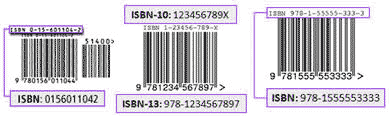
You will find the ISBN, UPC or EAN on the packaging and/or back cover of your item.ISBN
Do not include hyphens when entering these numbers. However, if a 10-digit or 13-digit ISBN ends with the letter X, be sure to include the letter.
The ISBN reference must be 10, 12 or 13 characters. If you have a reference with 9 characters please add a 0 at the beginning of the reference.
ISBNs are located above the bar code:
UPC
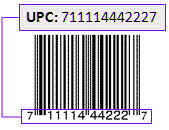
When entering a UPC, be sure to include the smaller numbers on the left and right sides of the bar code.
UPCs are found below the bar code:
EAN
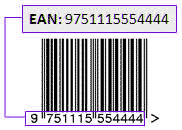
When entering an EAN, don't include dashes between any of the 13 digits in the number.
EANs are found below the bar code:
35) Can I add defaults to forms when selling to save time?
If you check out the My Defaults section of My eBid you can add defaults to almost any field of the listing form. You can save different sets of defaults and also set up one set of defaults to show automatically when you arrive on the listing page. You will see each of your default sets in a dropdown menu on the list new auction page. You will also see a list of your previous auctions that you can choose from to populate the form with. Click on the "saved & previous" tab at the top right hand side of the auction listing page to add a default or recent auction listing.
36) What happens to data I "Save for Later" when listing?
Items you "Save for Later" are saved to the "My eBid" > "My Defaults" section, they can be edited or deleted there. You can recall them when listing by clicking the "Populate" tab at the top of the listing form. You will be shown two dropdown menus, one of your saved items and one of your recently listed items, choose which you want to recall and it will populate the listing form with the relevant data.
37) What is the SKU facility on the Listing Form?
SKU stands for Stock Keeping Unit. It is basically just somewhere you can place a code or unique identifier for the item you are selling to help you recognise it. Larger sellers may wish to use this to help them pinpoint the exact item sold after an auction closes if they have many similar auctions with similar titles.
38) What is a "Private Listing"?
A Private Listing allows customers to bid without showing their usernames. Tick the box on the listing form to enable this.
39) What does "Run Until Sold" mean?
"Run Until Sold" is available for Fixed Price sales (sales which only have a BuyNow price and do not have any bidding facilities). If you have say 10 items up for sale on a Fixed Price sale then this sale will run until all items are sold. It does not have a fixed ending time. Available to GOLD only.
Run Until Sold items will be removed from sale if the seller does not login to eBid for 60 days. If the seller remains a regular user of eBid then RUS items won't be removed from sale automatically.
40) What is the "Fixed Price" checkbox for?
Fixed Price means that there is only a BuyNow price for this auction, there are no bidding facilities available. If you choose to use the Fixed Price method then this also opens the option to use the Run Until Sold method for ending your auction, see above. GOLD and PLATINUM LIFETIME only.
41) Can I add a video to my listing?
You can add YouTube videos to your auctions if you have a GOLD or PLATINUM LIFETIME subscription. To do this you simply add your YouTube video code into the box provided in Section One when posting your auction. You can find the code in the "About This Video" box when you're watching the video on YouTube.
42) How can I advise potential buyers I am away on vacation/holiday?
You can add a note to all your auctions by going to My eBid > My Notices. You will also have the option to stop customers bidding on your auctions whilst you are away. To do this select 'Create New Notice' and tick the Holiday Notice box. Don't forget to deselect this option on your return.
43) Shipping Options. Editing and additional shipping for multi purchases.
If you wish to change your shipping options manually go to My eBid > Listings I'm Running and click on the Edit link to the right of the listing. You can add your shipping options from this page. If you have multiple auctions and it would be too time consuming to change your auctions manually go to My eBid > My Bulk Edit to change all or a selection of your auctions.
If you wish to specify additional postage costs for customers making Multi-item purchases (quantity greater than 1), when posting a new auction, once you have added the quantity in Section One you will see a new entry box in Section Two shipping sections - 'Each extra item will add'.
Please note: USPS Standard Post for Calculated Shipping is now only available for zones 5 and above from the originating zip code. If you wish to use USPS Standard Post for zones 5 and above then you should ensure you also include USPS Priority Mail as its equivalent shipping method for zones 1 - 4.
44) Can I start my listing at a specific time?
Yes, GOLD and PLATINUM LIFETIME eBidders can use the Custom button on the listing page to popup a calendar to choose the exact day and minute to start your auction, the calendar should show right next to the button, scroll up a little if you don't see it.
45) Can I end my listing at a specific time?
Yes, GOLD and PLATINUM LIFETIME eBidders can choose in days, hours and minutes exactly how long to run their auctions for. Work out how long from now you want it to close and insert the correct figures. For even more accuracy use this in conjunction with a Custom start time to pin point to the nearest second the time to close your listing.
46) What is the eBid Ninja Lister?
The eBid Ninja Lister is a downloadable application that will run on Windows, OSX and Linux. SILVER, GOLD and PLATINUM LIFETIME users can go to My eBid > My Bulk Upload to download it. You will need to install Adobe AIR with Webkit before installing Ninja Lister, not the version without Webkit. It allows you to create listings offline using photos located on your hard drive and to upload them to eBid all at once. It also allows you to import your data inventory files from other online marketplaces. For more help with Ninja Lister see this thread in our forums.
Do not post wording in listing titles that may contravene Googles listing policies. For example it is our experience that Google do not like 'Free Shipping' in titles or descriptions.
If you are having issues installing Ninja Lister and are using McAfee anti virus software, you may need to temporarily disable the real time scanning option to install the software. Please follow the steps below:
1. Open your McAfee software program.2. In the Virus and Spyware Protection section, turn Off the Real Time Scanning option (select the lowest option 15 minutes). Select Done.
3. Install the Ninja Lister software.
4. In McAfee turn On the Real Time Scanning option.
47) Can I import listings from other Marketplaces?
Please refer to our Forum thread Ninja Lister importing listings for further information on this topic.
48) Will you upload my items to Google Shopping?
eBid is an official Marketplace Partner of Google. We will upload your items to Google Shopping within minutes of you listing them if Google Shopping is available in your home country. Please also refer to the Google Shopping Restricted Products page and Google Shopping user guide section for more information.The criteria for upload are a PLATINUM, GALLERY, FEATURED or FRONTPAGE listing together with:
Auction listing with at least 3 days remaining & BuyNow available
OR
Auction listing with On First Bid & BuyNow available
OR
Fixed Price listing with at least 3 days remaining
OR
Fixed Price listing with Run Until Sold
Google Shopping requires customers to provide a way for potential buyers to purchase the product through an online payment service. Therefore all listings will require at least one online payment option present. For example Paypal. Listings without at least one of these payment options will not be uploaded to Google Shopping.
Due to current policy restrictions at Google Shopping, eBid will not submit items that do not pass the following tests A, B or C.
A) Media (books/cd/dvd/blu-ray/video games)
1 - minimum) An ISBN/UPC/EAN/MPC is supplied to us.
B) Clothing
1 - minimum) A BRAND is supplied to us.
C) Items that could have been purchased in a shop in their lifetime and scanned at a checkout till
1 - ideal) A UPC/EAN/MPC and BRAND are supplied to us.
2 - good) A UPC/EAN/MPC is supplied to us.
3 - minimum) A BRAND is supplied to us, although we do not guarantee acceptance by Google in this case due to their strict policy criteria.
Items that come under D will require exemption from Google's Unique Product Identifier rules
D) Custom Made, One of a Kind, Vintage, Collectable, Comics with 17 digit UPC codes
Add the text EXEMPT (does not have to be uppercase) as your barcode.
Google uses your eBid Store Name at Google Products. If you don't have an eBid Store Name your eBid Username will be used.
Please ensure your Store Name/Username complies with Googles guidelines. Some guidelines are outlined below:
Enter the name of your store without any additional text. You do not need to include "Inc.," "Co.," "GmbH," etc.
Avoid unnecessary use of the following:
- Promotional text (e.g. phone numbers, marketing messages, sale announcements, free shipping etc.);
- Repeated and unnecessary use of punctuation, capitalization, or symbols (e.g., spelling your store name in ALL CAPS);
- Copyright and trademark symbols;
- Offensive or inappropriate language.
Here are some examples for Store Names rejected by Google recently:
ABC Storename LtdAbc Ebid Craft Supplies Ink And Pens
Storename Storename on eBid
1234st1234
storename_storename_couk
storename123456
Items in the Electronics, Books, and Media categories may not appear in Product Search if your listing does not include the necessary unique product identifiers, such as MPN, Brand, GTIN/UPC/EAN or ISBN.
The Title and Description must be in the language of the Google site your items are uploaded to. e.g. items uploaded to eBid France will be posted to Google France so must be in the French language.
Avoid placing full capital lettering throughout the title. Use sparingly with capital letters only at the beginning of a sentence or word. All capitals are not allowed. All symbols such as /"!(*#@]+ 1 etc, are not allowed. Never have anything in the first 250 characters of your description that refers to shipping or that says anything not directly related to describing your item.
If you should see 'iframe' in your listing description box this is likely to be due to Google seeing the input information as 'Cross Site Scripting (XSS)'.
Once items have been uploaded to Google Products we are reliant on Google to place the listings in the Searches. Google list items at their discretion and it is not always obvious why an item has not been included.
Please review below. If you feel changes are required, please close the auction/s and repost with the changes and hopefully the item/s will be submitted. We have no control but in the vast majority of cases items will be listed without a problem if they have a 'Buynow' feature and more than 48hrs to run.
Prohibited products - (This is not an exhaustive list and is subject to change at anytime by Google).
Affiliates, catalogued drop-shipping programs, and multi-level marketing: Posting is not permitted for the promotion of affiliate or pay-per-click links, products sold through a commission-based relationship, or sites that sell through cataloged third-party drop-shipping programs. This includes item pages that are made up almost entirely of advertisements, or pages where advertisements obstruct the view of the product. Posting is not permitted for the promotion of multi-level marketing (MLM) business products or for other businesses that recruit members and offer them rewards for recruiting others and/or selling services.
Anti and Violence: products and associated websites may not promote violence or advocate against a protected group. This standard applies to everyone who wants to post on Google, whether we agree with their viewpoint or not. A protected group is distinguished by their race or ethnic origin, color, national origin, religion, disability, sex, age, veteran status, or sexual orientation/gender identity.
Body parts: Posting is not permitted for the promotion of body parts or human remains.
Bulk marketing tools: The promotion of the following bulk marketing products is not permitted if the stated or implied use of these products is unsolicited spam:
Email lists that are not opt-in
Bulk email software
Bulk messaging
Copyright unlocking devices: Posting is not permitted for the promotion of mod chips or other devices designed to circumvent copyright protection.
Copyrighted or counterfeit goods: All products must respect copyright and trademark law. Posting is not permitted for unauthorized or "bootleg" copies of media, software, or other licensed or protected material. Posting is not permitted for products that are replicas or imitations of designer goods; Products without a celebrity endorsement that would normally require such an association, fake autographs, counterfeit stamps, and other potentially unauthorized goods.
Drugs, drug paraphernalia, and drug test circumvention aids: Posting is not permitted for the promotion of illegal drugs and drug accessories, including herbal drugs such as salvia and magic mushrooms. Posting is not permitted for the promotion of products such as drug cleansing shakes and urine test additives.
False representation: You may not post on behalf of Google, or otherwise impersonate a Google employee.
Fireworks and hazardous materials: Posting is not permitted for fireworks and related goods; toxic, explosive, flammable, and radioactive materials and substances
Gaming/gambling: Posting is not permitted for online casinos, sports books, bingo, and affiliates with the primary purpose of driving traffic to online gambling sites.
Illegal goods and services: You must post in accordance with the laws of your target country. Posting is not permitted for materials, products, or information promoting illegal goods or enabling illegal acts. You may not disclaim knowledge of, or responsibility for, the authenticity or legality of the products you offer. You must authenticate any products you sell. Submitted products must be legal in the entire target region in order to be accepted. For example, items submitted to Google Product Search US must be legal in all 50 states.
Images containing promotional messages, including watermarks or promotional text are prohibited.
Posting is not permitted for illegal knives or other illegal weapons.
Posting is not permitted for pornographic materials involving minors.
Posting is not permitted for fake IDs, passports, diplomas, and noble titles.
Posting is not permitted for manuals, how-to guides, information, or equipment enabling illegal access to software, servers, websites, or other protected property.
Posting is not permitted for products that descramble cable and satellite signals in order to obtain free service.
Miracle cures: Posting is not permitted for the promotion of unsubstantiated cures, remedies or other products marketed as quick health fixes.
Online gaming goods and services: Posting is not permitted for the promotion of currency, items, or related services for online games.
Personal Information: You may not post content that includes contact or personal information about another individual without their permission.
Precious metals: Posting is not permitted for the promotion of rare, scarce, or valuable metals or gemstones.
Prescription drugs or pharmacies: Posting is not permitted for the promotion of prescription drugs without valid PharmacyChecker or the Royal Pharmaceutical Society of Great Britain (RPSGB) approval. Google only accepts listings for pharmacies that are based in the US, UK, and Canada. Learn more about accepted pharmacies.
Services. Posting is not permitted for the promotion of services. The term service refers to an intangible economic activity that does not result in ownership of specific goods.
Wholesale currency: Posting is not permitted for the promotion of discounted currencies or currency exchanges.
Editorial Guidelines
All your product submissions should follow three principles:
Be honest and factual.
Describe your message clearly and accurately.
Include relevant and complete information about your products with attributes.
In addition, make sure you:
Use Standard Spelling and Grammar. Avoid any repeated and unnecessary use of punctuation, capitalization or symbols. Don't use exclamation points in your product titles. The use of symbols, numbers, and letters should adhere to the true meaning of the symbol.
Avoid gimmicky repetition. You may not post excessive, repetitive, or irrelevant keywords.
Avoid excessive use of keywords.
Do not post wording in listing titles that may contravene Googles listing policies. For example it is our experience that Google do not like 'Free Shipping' in titles or descriptions.
Avoid offensive or inappropriate language.
49) Seller Tips.
There are a number of factors that may be hindering your sales and there a numerous things you can do to increase the exposure of your items and your own profile.
If you have listed items as 'Run Until Sold', we would advise you to list on 7-10 days with 10 auto reposts. This has the advantage of not letting your listings drop to the bottom of the search pages (all Run Until Sold listings will be placed at the bottom of any relevant searches). For further information see 2) below:
Check List
1) The one single biggest factor is being able to upload your products to Google Shopping.
The program allows eBid to submit products frequently and with all relevant attributes to Google Shopping Searches, enabling online shoppers to have up-to-date information on your products.
Requirements.
You need to have GOLD or PLATINUM LIFETIME status OR if you are SILVER status use the Platinum Auction to be able to add a BuyNow price. Go to My eBid > My Subscriptions to upgrade. GOLD and PLATINUM LIFETIME customers have the option to upload listings for zero cost.
Eligible listings.
- Available to United Kingdom, USA, Canada, Germany, Spain, Italy, France, Australia, Brazil and Netherlands eBid members.
- Item complies with Google Product Policies and meets the eBid listing criteria. Please see 48) Will you upload my items to Google Shopping? for more information.
DO make sure you add BRAND, SIZE and COLOR data when listing your clothing items. Google Shopping require certain data about your items before they will promote it for you.
2) "Run Until Sold" or "On First Bid" listings show at the bottom of search results. Try listing with attributes "Immediate", "BuyNow" and "Repost" features for maximum impact.
3) DO complete your"My All About Me" page which provides potential buyers with information on who you are.
4) DO be clear and concise with your shipping and returns policies. You'll be surprised how many buyers are put off by having to make contact with you to find out shipping costs and how long it takes for the item to be sent out.
5) DO create your own Stores. This gives you an identity and additional exposure within the "Stores"tab located at the top of all pages. GOLD account holders can start a single eBid Store and PLATINUM LIFETIME accounts 5 Stores for free with no extra monthly charge.
6) If you have feedback earned on other auction sites request an import to get your feedback started. Go to theMy eBid > My Feedback > FB Import tab.
Feedback over 5 removes the low feedback sunglasses icon. Once you get to this stage you will see an additional increase in the speed of sales.
7) DO use the Forum > Plug Your Auctions to advertise your wares and any special offers you are running. You can create one plug per day.
8) DO add a signature to your forum posts with a link to your items for sale.
9) DO tell your previous contacts where you are now - Without "spamming" and upsetting people try and let any previous customers know that you are selling on eBid.
10) DO price your items sensibly. As you are only paying between 0% and 5% sales fee and not 10% to 14% then don't be scared to price your items more attractively on eBid. You can reduce your prices and still make a larger profit margin on your items than selling elsewhere.
11) DO use our "Make an Offer" system. Just add a sensible BuyNow price to your items and tick the MaO box to listen to offers that your buyers are willing to make. You can set up automatic acceptance and rejections if you want to also.
12) DO add great photos. eBid can handle photos in all their glory no matter what the size. We will keep your original for zooming purposes on the listing details page and will make thumbnail versions for other places around the site. Take advantage and upload photos at the largest possible size to show your buyers your items as accurately as possible.
51) How can I pay or accept payment via PayPal.com?
Instant checkouts with PayPal are available to buyers when the seller is GOLD or PLATINUM LIFETIME status or SILVER status and using Platinum listing type.
To accept payment via PayPal you will need to open an account at PayPal. Once you have done this GOLD and PLATINUM LIFETIME account type holders can then add their PayPal username (email) to their "My Personal Details" section of "My eBid". The integrated checkout will not show to your buyers unless you have stored your PayPal username (email) with eBid. This will allow buyers to checkout immediately via PayPal when they buy from you. Make sure you check PayPal as a payment option when you start your auctions to enable the PayPal checkout. SILVER account type holders can open a PayPal account also and add PayPal as an option on their auctions but there won't be an automatic checkout available to their buyers. They will need to contact them with their PayPal details after the auction has closed or BuyNow has taken place.
IMPORTANT : Make sure you switch OFF the "Encrypted website payments" settings on this page on the PayPal website to allow your buyers to pay for your items on eBid.
You can add additional Paypal addresses to you eBid account if you wish. To do this go to your "My Personal Details" section of "My eBid". At the Paypal section select the + icon to add your additional addresses. When you post a new auction you will now have the option to select the appropriate Paypal account in the payment options.
Please note, if GOLD and PLATINUM LIFETIME customers are invoicing for multiple items, and have more than one Paypal account, if the items have different PayPal accounts linked to them then they will all be changed to the PayPal account of the initial item on the invoice.
SILVER account type holders can now choose the "Platinum Auction" option to enable an integrated PayPal checkout for an auction.
To make payment via PayPal you do not have to sign up beforehand but it is advisable so that you don't have any delays due to security checks. As long as you are purchasing from a GOLD or PLATINUM LIFETIME eBidder you can pay for your items in a normal shopping cart manner by entering your card details after you have won your item, you will see a checkout form and button to click. If your seller is a SILVER eBidder you can contact them via the After Sale Log to ask for their PayPal details.
Due to currency restrictions in some countries you will find that when paying for items with PayPal from sellers based in India, South Africa, Malaysia and Brazil that the amount you are paying will be converted from the local currency into USD.
54) Can I import my listings from Amazon?
From your Pro Merchant Seller Account page on Amazon, go to "Manage Your Inventory" > "Inventory Reports".
Select "Open Listings Report" report type from the pull down menu. Click "Request Report" button. That same page will show the status of your report, and you'll be able to download it from there.
The file should be tab delimited format and saved as a .txt file. This will be importable into Ninja Lister.
The file headers should be similar to the following:
item-name item-description listing-id seller-sku price quantity open-date image-url item-is-marketplace product-id-type zshop-shipping-fee item-note item-condition zshop-category1 zshop-browse-path zshop-storefront-feature asin1 asin2 asin3 will-ship-internationally expedited-shipping zshop-boldface product-id bid-for-featured-placement add-delete pending-quantity
Then choose the import option in Ninja Lister.
Please also refer to Can I import listings from other Marketplaces?
55) How can I Close or Delete all my listings at once?
If you are running a large number of auctions that you would like to Close or Delete, we would suggest using the Bulk Edit option.
Go to My eBid > My Bulk Edit (left hand menu), add your auctions to the Edit Bucket and use the Delete All Auctions or Close All Auction buttons at the foot of the page.
The other option for customers not running a large number of auctions is to Close or Delete via the Listings I'm Running section.
Go to My eBid > Listings I'm Running (left hand menu) then use the All Delete or All Close buttons at the top right hand side of the section then use the Close/Delete Selected Auctions button at the foot of the page.
56) How can I export a record of my current listings?
You can export your current listings as a spreadsheet based text file. This will enable you to save a history of your current listings using the eBid spreadsheet layout.
Go to My eBid > Auctions I'm Running (left hand menu) and select the Export Listings link at the top left hand side of the page. The resulting file can be opened using an Excel or Open Office spreadsheet. The file is in our eBid spreadsheet format and can be edited as required and imported via the My eBid > My Bulk Upload section or imported via Ninja Lister.
You can find more information on our eBid spreadsheet and Ninja Lister at My eBid > My Bulk Upload. We would suggest downloading our Bulk Upload spreadsheet from this section. The spreadsheet contains examples and instructions of how to import listings using a spreadsheet.
57) How can I add a sale/mark down/discount to my items?
Discounts can be added to BuyNow prices for between 0.1% and 99.9%. Maximum time is 45 days.
GOLD and PLATINUM LIFETIME users can see the discount facility on the edit page of a single item OR on the My Bulk Edit page.
Discounts will be carried over on auto-reposts. Single-reposts and mass-reposts will not carry any discount data over.
58) Can I import my feedback from another marketplace site?
See the Feedback FAQ.
59) Can I set up my listings to accept offers from buyers?
Yes you can. Our "Make an Offer" system is very simple. When you add a BuyNow price to your listing just tick the Allow buyers to Make an Offer? box just below the BuyNow box. A new button will appear on your finished listing. When buyers click this they can make you an offer below the BuyNow price. You will be emailed with the details and will have 48hrs to either
- Accept Offer
- Decline Offer
- Make a Counter-offer .
You can use the My eBid > My Bulk Edit function to update any current listings you have to accept offers. But remember your listings will be changed over to a Fixed Price format, any bidding facilities you had on your listings will be removed.
All the offers you receive can be seen in "My eBid Dashboard > Offers I Received". We allow a maximum of 4 declined offers/counter-offers per listing per buyer. Notes may be added to all offers and counter-offers.
60) Why are my photos/pictures not showing on search results for my listings?
If you have posted a listing with the listing types Free or Standard then you will see a camera icon against your listing in the category listings and search results rather than a thumbnail picture. To see a thumbnail picture SILVER accounts can upgrade individual listings using the Platinum listing type and GOLD accounts can upgrade listings using the Gallery listing option. Both subscription types can also post listings as Featured and Frontpage to obtain a thumbnail picture in the listings.
61) What is the criteria for appearing on the Hot Sellers list?
To qualify for the Hot Sellers list that can be found on the Buy section the minimum criteria can be found below.
- User must have a photo posted on the All About section.
- User must be active.
- Stores must not be in the Adult category.
- Feedback must be greater than zero.
62) How do I set up my listing so they require immediate payment?
If you wish successful buyers of your BuyNow listings (not Auction or Make An Offers sales) to pay immediately, you can select this as a default option via the My eBid > My Defaults section, under the General Defaults header. Buyers have 60 minutes to pay starting from the time of the most recent purchase and are restricted to purchasing 10 items. If no payment is received your listing will be reset to its standing prior to the purchase being made. If one of the items you buy has a closing time that is earlier than the 60 minute timeout then this earlier time will be used instead.
63) How do I repost a listing that has finished?
When you start a new listing eBid gives you many options, one of these is the "Auto-repost" option. This allows you to automatically repost the listing up to 10 times. So a listing of 7 days length can be reposted 10 times, meaning 70 days on eBid in total.
Once a listing runs out of auto-reposts it is transferred into your "Listings I Ran" section in the "My eBid" area. Now you have the option to relist/repost it again if required. There are a few ways to do this.
1) MASS REPOST - Locate the closed listing in question on the "Listings I Ran" page, tick the repost checkbox and submit using the button at the bottom. If the original listing had any sales on it then the new listing will have a different listing ID#. If it had no sales then the same listing ID# will be used.
2) FAST REPOST - On the listing review page of the individual closed listing you will see a button entitled "Fast Repost", clicking this will repost your listing using exactly the same data. If the original listing had any sales on it then the new listing will have a different listing ID#. If it had no sales then the same listing ID# will be used to help with search engine optimization.
3) SINGLE REPOST - On the listing review page of the individual closed listing you will see a button entitled "Repost", clicking this will take you to our normal listing form which will be populated with the details from the original listing. You can make any changes you wish here or simply click repost without making any changes. This method will currently start a new listing with a new listing ID#. In the future we will use the same listing ID# if no changes to the form are made
64) How do find the ID of an eBid category?
Visit the category page on the eBid Website and you will see a CAT ID number near the top of the page. eg. https://www.ebid.net/us/buy/video-computer-gaming/video-games/ .
Alternatively, download the eBid Spreadsheet from My eBid > My Bulk Upload, on there is a tab at the bottom entitled CATEGORIES which has a full list with category codes.
All categories are also stored within eBid Ninja Lister software, just click the SELECT button when listing an items for sale for a hierarchical menu of categories.